How to Set Up Emergency Access to Your Crypto Wallet
Self-custody comes with a hard edge that convenience-first services do not have. Because only you hold the keys, there is no support line, no password reset, and no company that can let anyone in on your behalf. That is the whole point when everything is going well. It becomes a problem the moment you are unreachable for a stretch: a long trip with no connectivity, a hospital stay, a period where you simply cannot get to your recovery material. Emergency access is the practice of arranging, in advance, for a trusted person to reach your wallet under conditions you define, without you exposing your keys today.
Done carelessly, "emergency access" just means giving someone your seed phrase, which recreates every risk self-custody was meant to remove. Done well, it is a sealed, conditional, revocable path that only opens when a rule you set is met. This walks through the difference and how to build the second version.
The gap self-custody leaves
A bank account has a chain of people who can act when the account holder cannot: joint owners, designated contacts, a branch that can verify identity. A self-custody wallet has none of that by default. If your recovery phrase sits only in your head or in one place only you know about, then a few weeks of being unreachable can mean funds that no one can move, including you, until you are back.
This is not an argument against self-custody. It is a reason to treat "what happens if I cannot reach this for a while" as part of the setup rather than an afterthought. The goal is continuity of access, arranged on your terms, for the periods when you are alive and well but simply out of contact.
What emergency access should mean, and what it should not
A good emergency-access setup has a few properties. It should never require you to hand over your keys or seed phrase now, while everything is fine. It should stay sealed until a specific, pre-defined condition is met. It should give access to one designated person for one specific purpose, not blanket control of everything you own. And it should be revocable, so you can change your mind or update the plan as your life changes.
The failure modes are the mirror image. Handing a partner your seed phrase today gives them full control immediately, whether or not that was your intent. Leaving the phrase in a place a helper "knows about" is an unsealed copy waiting to be found. A path that cannot be revoked locks you into a decision you made under different circumstances.
The risky ways people try to solve this
The common attempts all trade one problem for a worse one.
Splitting the phrase between two people sounds clever, but it turns a personal safeguard into a coordination problem, and either half in the wrong hands narrows the search dramatically. Writing the phrase into a document and telling a family member where to find it is an unencrypted copy that is only as safe as its hiding place. Storing it in a shared note or cloud folder puts the master key to your funds on infrastructure a provider can read. Each of these gives access, but it gives access now, to whoever reaches the copy, under no conditions at all.
Emergency access should do the opposite: no readable copy anywhere, and no access until the rule fires.
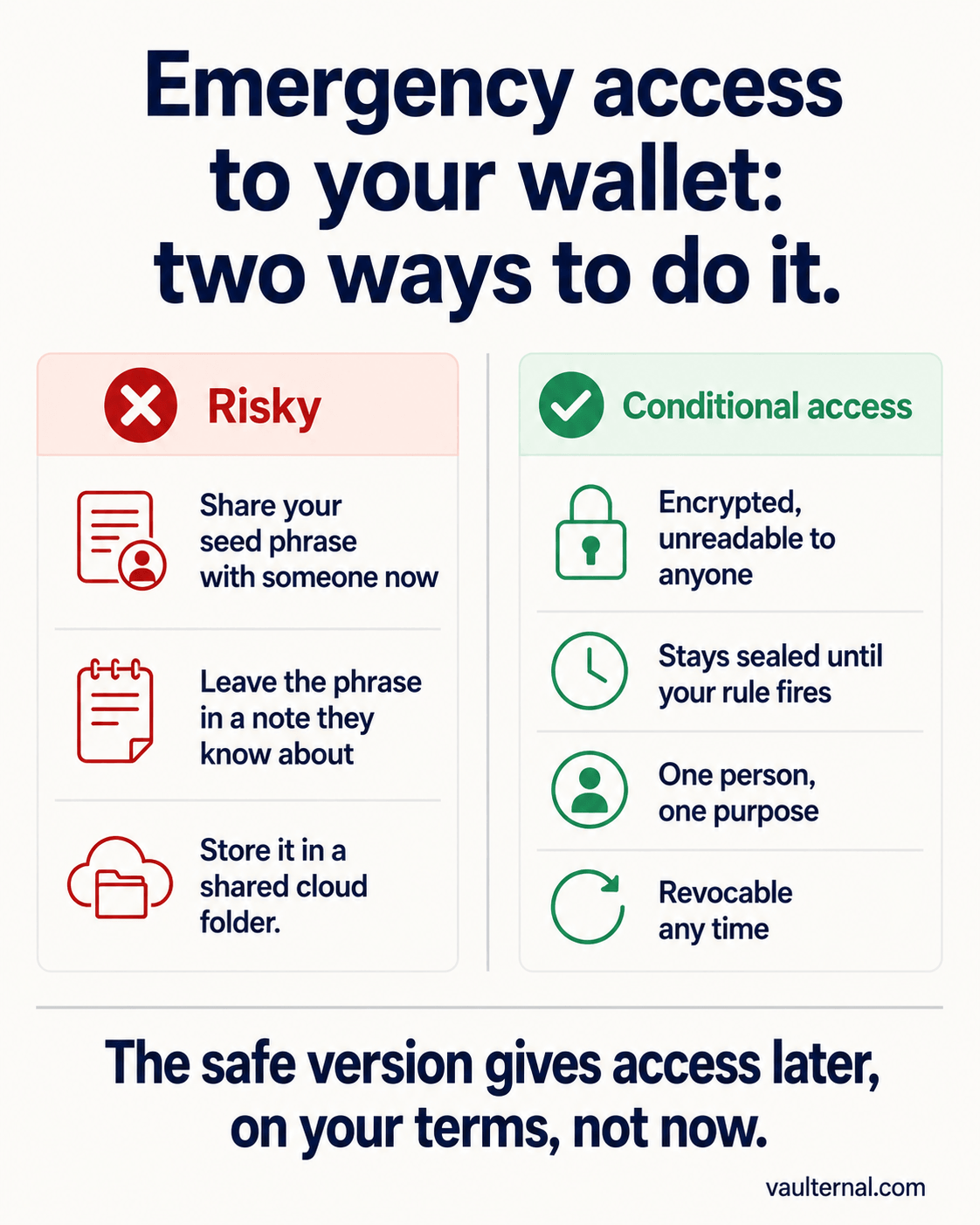
The safe version grants access later, on your terms, and stays sealed until then.
A conditional-access approach
The pattern that actually fits is conditional access. You encrypt your recovery material so the stored copy is unreadable to anyone, including the service holding it. You designate a specific recipient. Then you attach a condition that decides when, and only when, that recipient can reach it. That condition might be a check-in rule that opens access if you have not confirmed you are around for a defined period, a specific future date, or a manual release you trigger yourself.
Until the condition is met, the recipient has nothing usable. They cannot read the material, and neither can the storage provider. When the condition is met, they receive a path to decrypt it on their own device. The plan sits sealed in the meantime, and you can change or cancel it at any point.
Setting it up with Vaulternal
Vaulternal is built around exactly this pattern. Your recovery material is encrypted in your browser with AES-256-GCM before it is uploaded, so the stored copy is indistinguishable from random noise without your key. Delivery to a recipient uses double-layer secp256k1-ECIES encryption: the recipient layer means only your chosen person can ever decrypt it, and the oracle layer means the service that watches for your condition never sees the file key or the contents. The mechanism is described in full in how automated triggers deliver files under conditions you define.
The condition itself is a trigger you configure. A check-in trigger opens access to your recipient if you stop confirming you are reachable for a window you set, which is what makes it useful during a long trip, an extended period offline, or a hospital stay. You can also use a specific date or a manual release. Because this all sits on top of an encrypted vault, the same place can hold the keyless inventory of what each wallet contains that makes a recovery actually actionable later. For the broader self-custody workflow, start with the crypto vault overview.
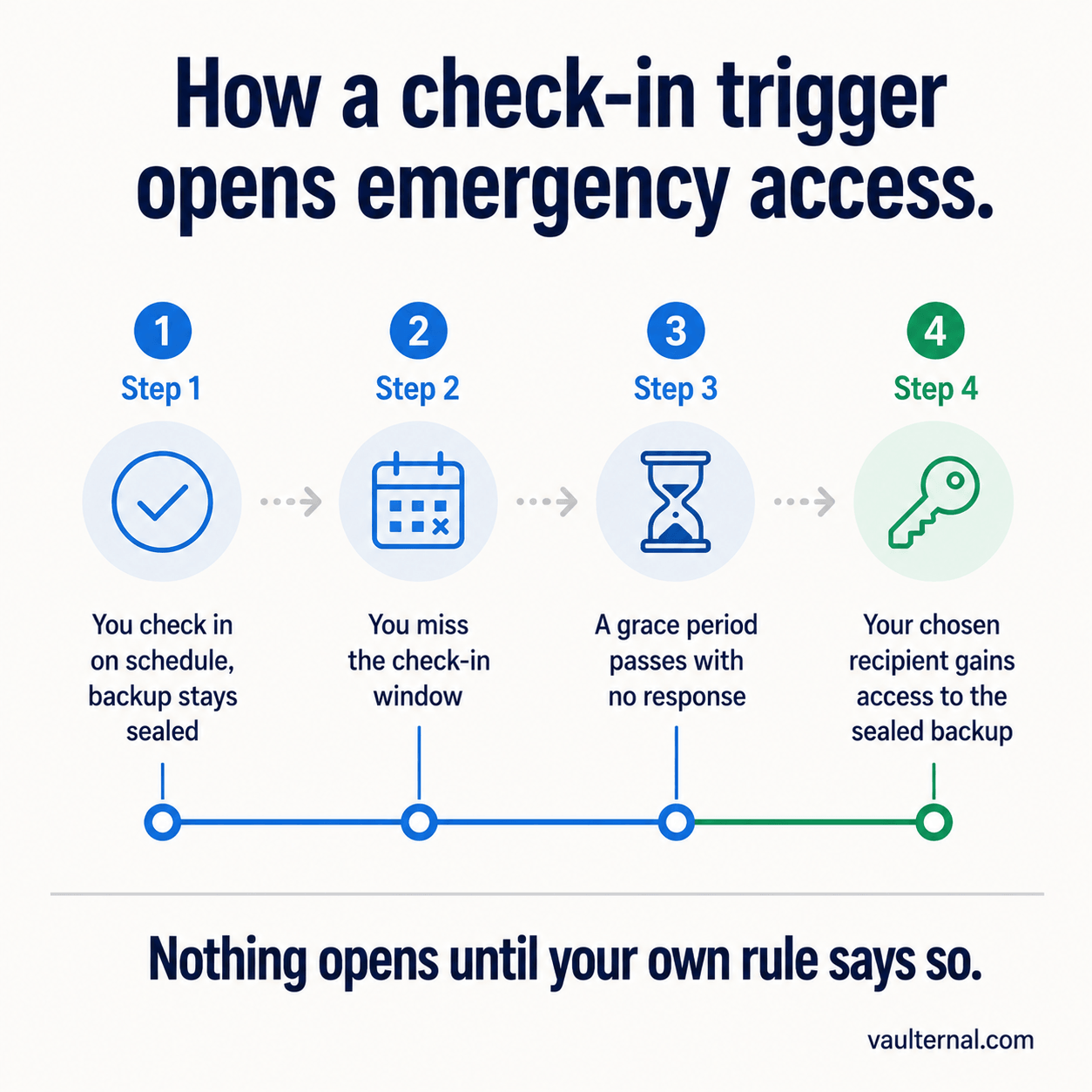
A check-in trigger opens access only after you have gone quiet past the window you set.
One honest caveat applies to the whole approach. This protection rests entirely on your key. If you lose it and have not set up any recovery path of your own, no one, including us, can restore access. Emergency access is a way to add a conditional path for someone you trust; it does not remove your responsibility for the key itself. Backing that key up properly is a separate step, covered in how to back up your seed phrase safely.
A setup you can do this week
- Get your recovery material into a durable, private form first, following the seed-phrase backup guide above.
- Encrypt a copy in a vault, so an off-site version exists that no provider can read.
- Choose one trusted recipient and one purpose for their access.
- Attach a condition: a check-in window, a date, or a manual release.
- Tell the recipient the plan exists and what it is for, without giving them anything readable now.
- Revisit it once a year, and update the recipient or the window if your situation has changed.
Self-custody does not have to mean that a few quiet weeks put your funds out of everyone's reach. Set the conditional path in advance, keep it sealed, and the access opens only when you decided it should.