How to Back Up Your Seed Phrase Safely (Without Screenshots or the Cloud)
A seed phrase backup has to solve two problems at once, and most methods only solve one. It has to survive a fire, a flood, a lost phone, or a hard drive that dies, and it has to stay secret from everyone who is not you. A screenshot in your camera roll solves neither. Writing the words on a sticky note solves the secrecy problem right up until the note is lost. The safe approach is the one that keeps the phrase durable and unreadable to anyone else at the same time.
What follows is what a seed phrase actually protects, the ways people lose access to their crypto, and how each backup method holds up against both risks at once.
What your seed phrase really is
A seed phrase (also called a recovery phrase or mnemonic) is usually 12 or 24 words generated when you create a self-custody wallet. Those words are a human-readable form of the master key to every account in that wallet. Anyone who has the phrase can rebuild the wallet on any device and move the funds. No password reset, no support line, no bank to call. That is the point of self-custody: you hold the key, so you carry the responsibility for it.
Because the phrase is the key, backing it up is not optional. If the device holding your wallet fails and you have no backup, the funds are gone. If the phrase leaks, the funds are gone just as fast. Every decision below is a balance between those two risks.
The two ways people lose crypto
Almost every loss story comes down to one of these:
- Loss: the only copy of the phrase is destroyed or misplaced. A single sheet of paper in one drawer is one accident away from zero.
- Exposure: the phrase reaches someone who should never have it. A photo synced to a cloud album, a note in an app the provider can read, a text to yourself that sits in a message history.
A good backup reduces both at once. A method that fixes one risk by making the other worse just moves the danger somewhere you will not be looking.
How the common methods actually hold up
Memorizing it. Tempting, and free. Human memory is a single point of failure with no redundancy, and stress makes it worse. Fine as a supplement, never as your only copy.
A screenshot or photo. This is the most common mistake, and the most dangerous. Phone galleries sync to cloud backups by default, which means your 24 words land on a server the provider can read, get scanned by automated systems, and stay in backups long after you delete the original. Treat any photo of a seed phrase as already public.
A note in a cloud app or an unencrypted password manager field. Better than a photo, but many note and storage apps hold the keys to your data, so the provider can technically read what you store. A password manager built for logins is also not designed for a recovery phrase, as we covered in the problem with password managers for non-password secrets.
Paper. No network, no provider, nothing to hack remotely. The weaknesses are physical: paper burns, fades, tears, and gets thrown out by accident. A single paper copy is fragile. Two paper copies in two locations is meaningfully more durable.
Metal. Stamping or engraving the words into steel survives fire and water in a way paper cannot. The remaining risk is discovery: a metal plate is only as safe as its hiding place, and anyone who finds it can read it instantly because it is not encrypted.
An encrypted digital backup. Encrypting the phrase before it is stored means the stored copy is unreadable without your key, so it can live on ordinary storage without exposing the words. Done with client-side, zero-knowledge encryption, the service holding the file cannot read it either. This is the method that addresses durability and secrecy together, and it is worth understanding why the encryption model matters, which we explain in why zero-knowledge architecture matters for your files.
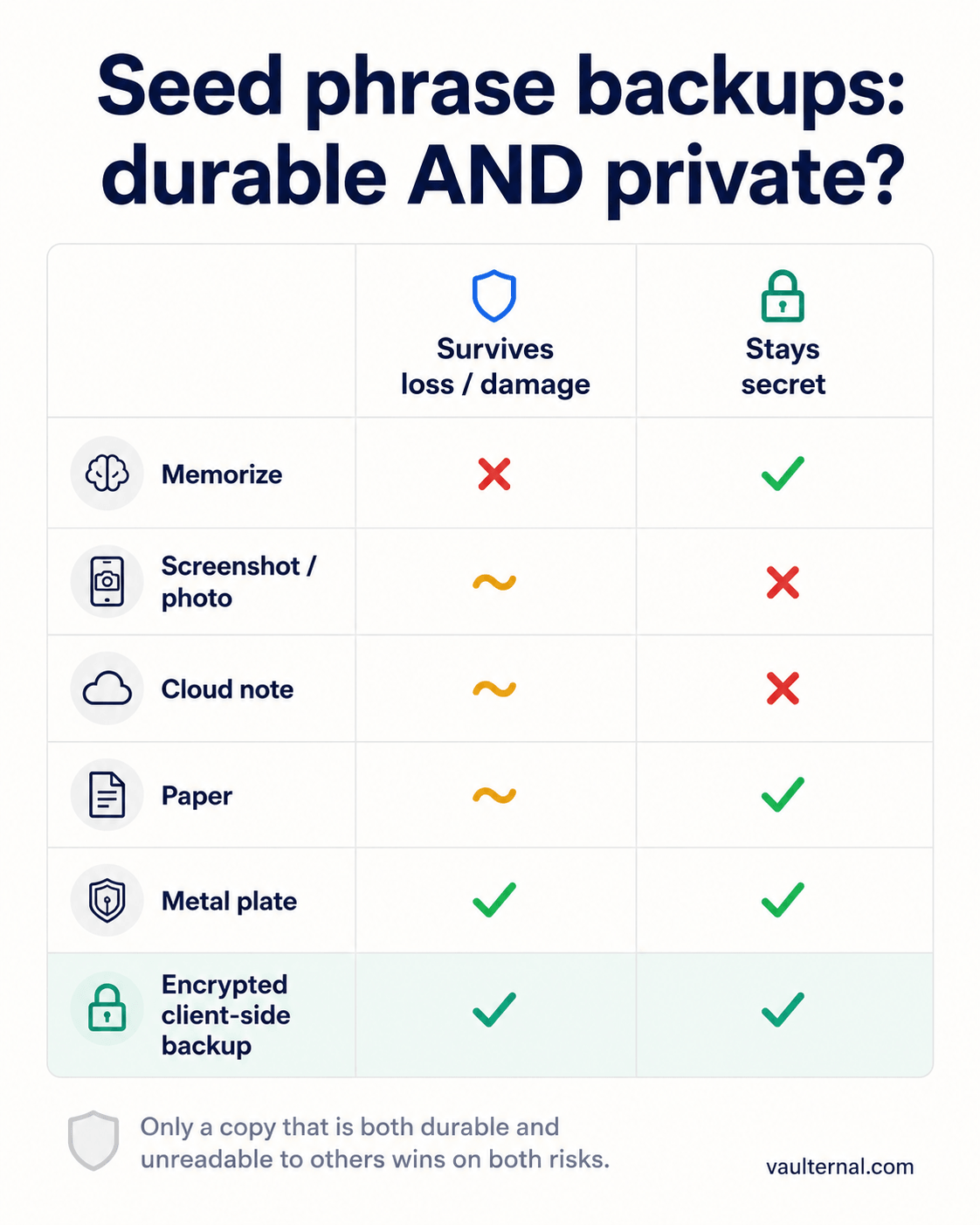
How each backup method scores on the two risks that actually matter: surviving loss, and staying secret.
The screenshot trap, in detail
It is worth being specific about why a photo is the worst option, because it feels convenient. The moment you photograph your phrase, the following happens without any action from you. The image syncs to your cloud photo library. It is included in device and cloud backups. And on many platforms it may be processed by automated content systems. You have now placed the master key to your funds on infrastructure you do not control and cannot audit. If you have already done this, move the funds to a new wallet with a fresh phrase and start the backup over. The old phrase should be considered compromised.
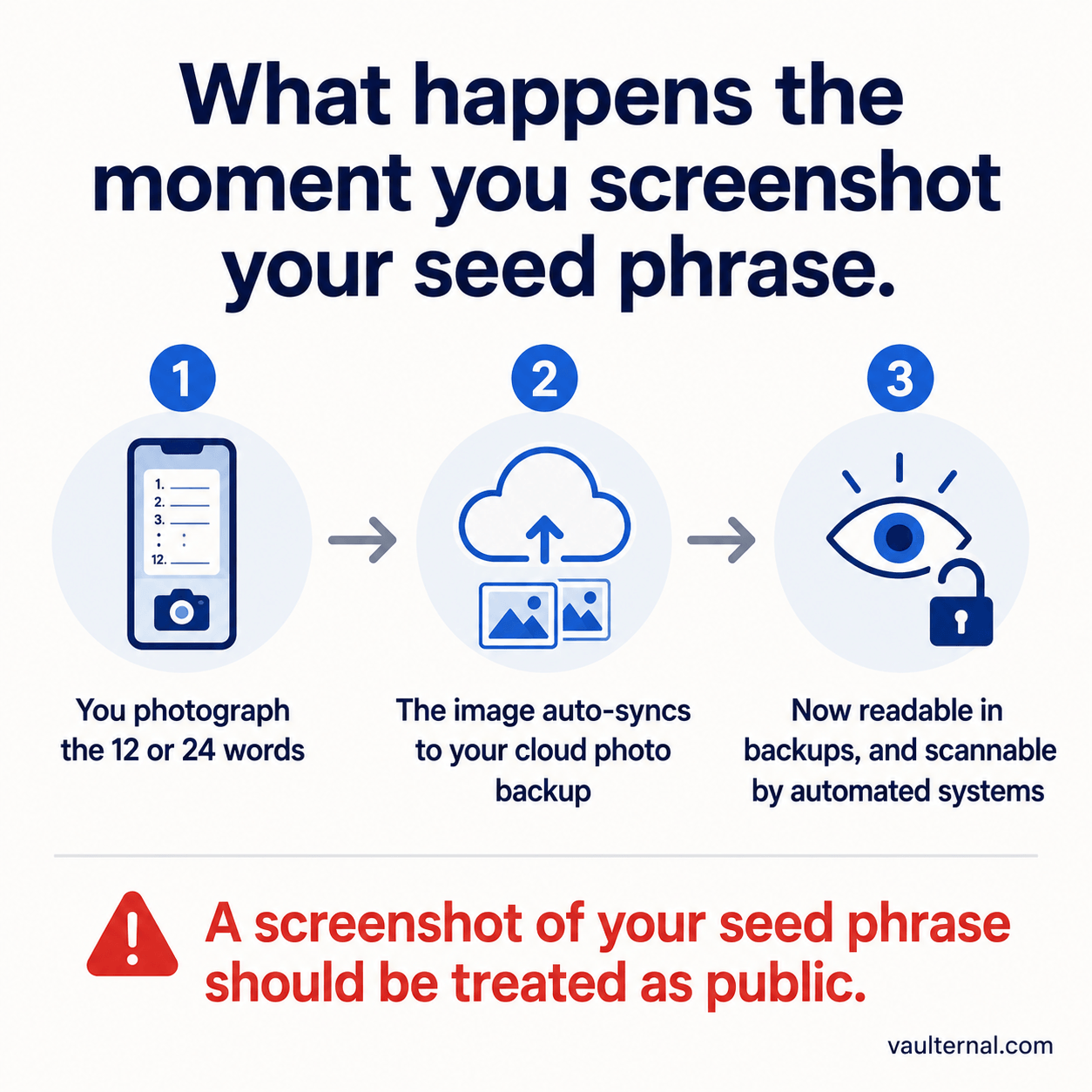
Why a photo of your recovery phrase should be treated as already public.
A layered backup that survives real accidents
Redundancy beats any single perfect copy. A practical setup looks like this:
- A durable physical copy (metal preferred, or two paper copies) stored somewhere fire-safe and private. This is your offline anchor.
- An encrypted digital copy protected with client-side encryption, so a second copy exists off-site without the words ever sitting in readable form. This survives the loss of your home and does not depend on you remembering where the metal plate is.
- A record of what the wallet contains, kept separately from the phrase itself, so the backup is usable later. A phrase with no context is hard to act on. Keeping a plain inventory of wallets and what they hold, without the keys, is a habit we outline in the crypto inventory guide.
No single copy is trusted to be indestructible, and no copy is stored in a form a stranger could read.
Planning for the times you cannot reach it yourself
Durability is only half of continuity. There are ordinary situations where you are alive and well but simply unreachable for a stretch: a long trip with no connectivity, an extended period offline, a hospital stay, a planned handover of a project to a partner. If your backup is a metal plate only you know about, no one can act on your behalf during that window even when you want them to.
This is where conditional access is useful. Instead of handing a trusted person your phrase today, which recreates the exposure risk, you can arrange for an encrypted backup to become reachable to a specific person only under conditions you define in advance. Vaulternal's check-in system is built for exactly this: you set the conditions, the encrypted file stays sealed until they are met, and the person you chose gets access without you ever exposing the phrase in the meantime. The full mechanism is described in how automated triggers deliver files under conditions you define.
How Vaulternal handles a seed phrase backup
When you store a recovery phrase in a Vaulternal vault, it is encrypted in your browser with AES-256-GCM before anything is uploaded. The key is derived from your wallet, which only you control, so the encrypted copy that reaches our infrastructure is indistinguishable from random noise without that key. We do not receive the phrase, the key, or the plaintext at any point, which means we cannot read your backup even if we were compelled to try. You get an off-site, durable copy that stays as private as the metal plate in your safe. You can see how this fits the broader self-custody workflow on the crypto vault overview.
A quick checklist
- Never photograph your seed phrase or store it in a gallery-synced app.
- Keep at least one durable offline copy (metal beats paper).
- Add an encrypted off-site copy so a single accident cannot wipe out your only backup.
- Store a keyless inventory of what each wallet holds, separately from the phrase.
- Decide in advance how a trusted person could reach a backup if you are unreachable, using conditional access rather than handing over the words now.
Back up for both failure modes, loss and exposure, and your recovery phrase will still be there and still be private on the day you actually need it.