Client-Side vs Server-Side Encryption: What's the Difference?
Every cloud storage provider promises encryption. It shows up on every marketing page, right next to "bank-grade security" and a padlock icon. But encryption is not a single thing. The question that actually matters is not whether your files are encrypted, but where the encryption happens and who holds the keys.
Think of it this way. A hotel safe and a home safe both protect your valuables. But a hotel safe exists in a room the hotel owns, and the hotel keeps a master key. A home safe sits in your house, and no one else has the combination. Both are real safes. Both technically work. But they protect against very different threats, and they require very different levels of trust.
The same distinction applies to encryption. This article breaks down where encryption happens in each model, who controls the keys, and how to tell which kind of "encrypted" a service actually means.
How Server-Side Encryption Works
Server-side encryption means the provider encrypts your files after they arrive on its servers. You upload a document (over a TLS-encrypted connection, which is a separate layer), the server receives it in readable form, and then the server encrypts it before writing it to disk. The encrypted file sits at rest on the provider's storage, protected from anyone who might physically steal a hard drive or breach the storage layer directly.
This is the hotel safe model. The safe is real, the lock works, but the hotel keeps a master key. The provider controls the encryption keys, which means it can, in principle, read your data. A government subpoena, a rogue employee with sufficient access, or a breach of the key management system could expose your plaintext files. You are trusting the company's internal controls and legal posture rather than a mathematical guarantee.
Most major cloud storage services use this approach. It is effective against external attackers targeting the storage infrastructure. It is not designed to protect your data from the provider itself.
How Client-Side Encryption Works
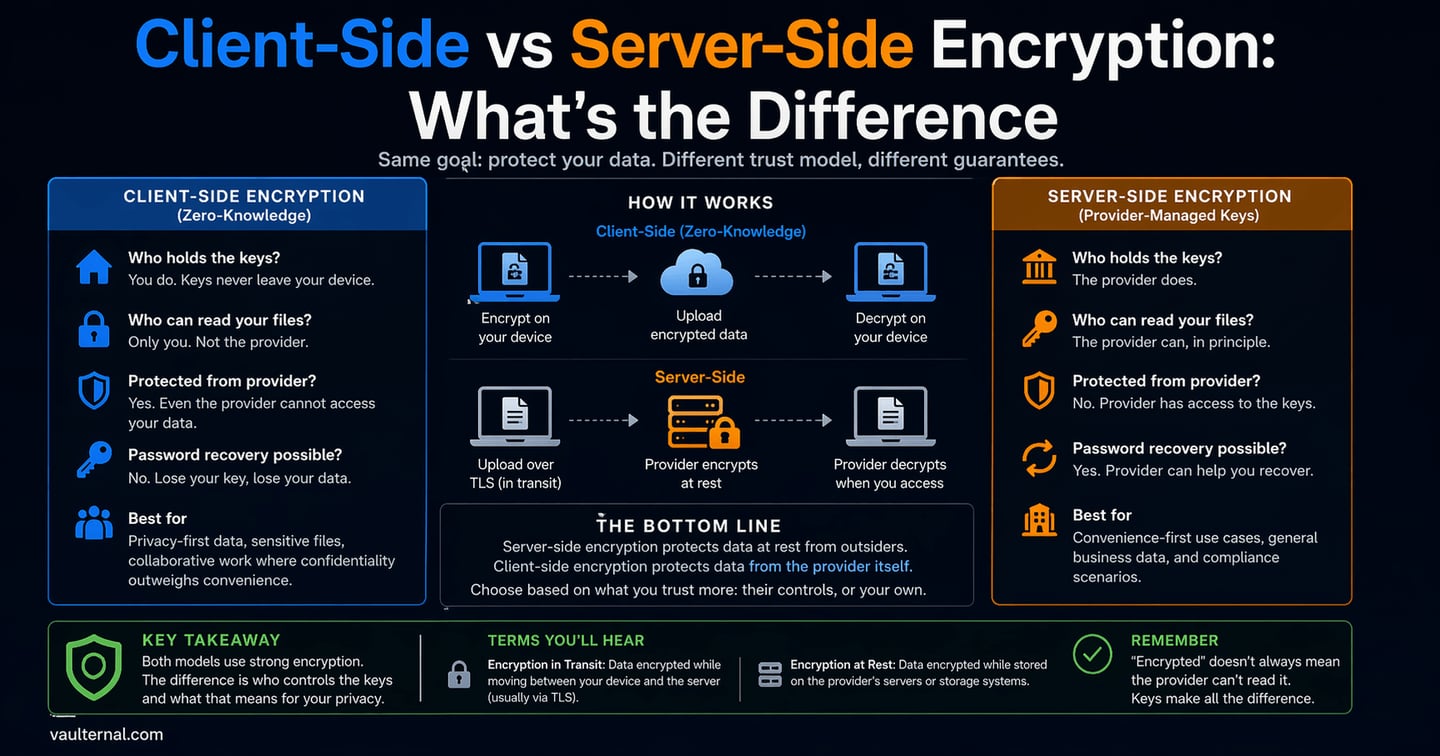
Client-side encryption flips the model. Your files are encrypted on your own device, before they leave your browser or application, and they arrive at the server already encrypted. The server stores ciphertext it cannot read. The encryption keys never leave your device and are never shared with the provider.
This is the home safe model. You set the combination, you keep the combination, and no building manager has a master key. Even if someone broke into the building, they would find a locked safe they cannot open.
The practical result is that the service literally cannot access your data, and that comes from how the cryptography works rather than from any policy it has adopted. Even if the provider wanted to read your files, or was ordered to by a court, it does not have the keys to comply.
The tradeoff is responsibility. If you lose your encryption key, no one can recover your files. There is no "forgot my password" flow that resets access, because the provider never had access to begin with. Modern implementations soften this by deriving keys from a recovery phrase (using standards like BIP-39), so you manage a set of words rather than a raw cryptographic key. But the principle holds: you control the keys, and no one else can grant or revoke access on your behalf.
What "Zero-Knowledge" Actually Means
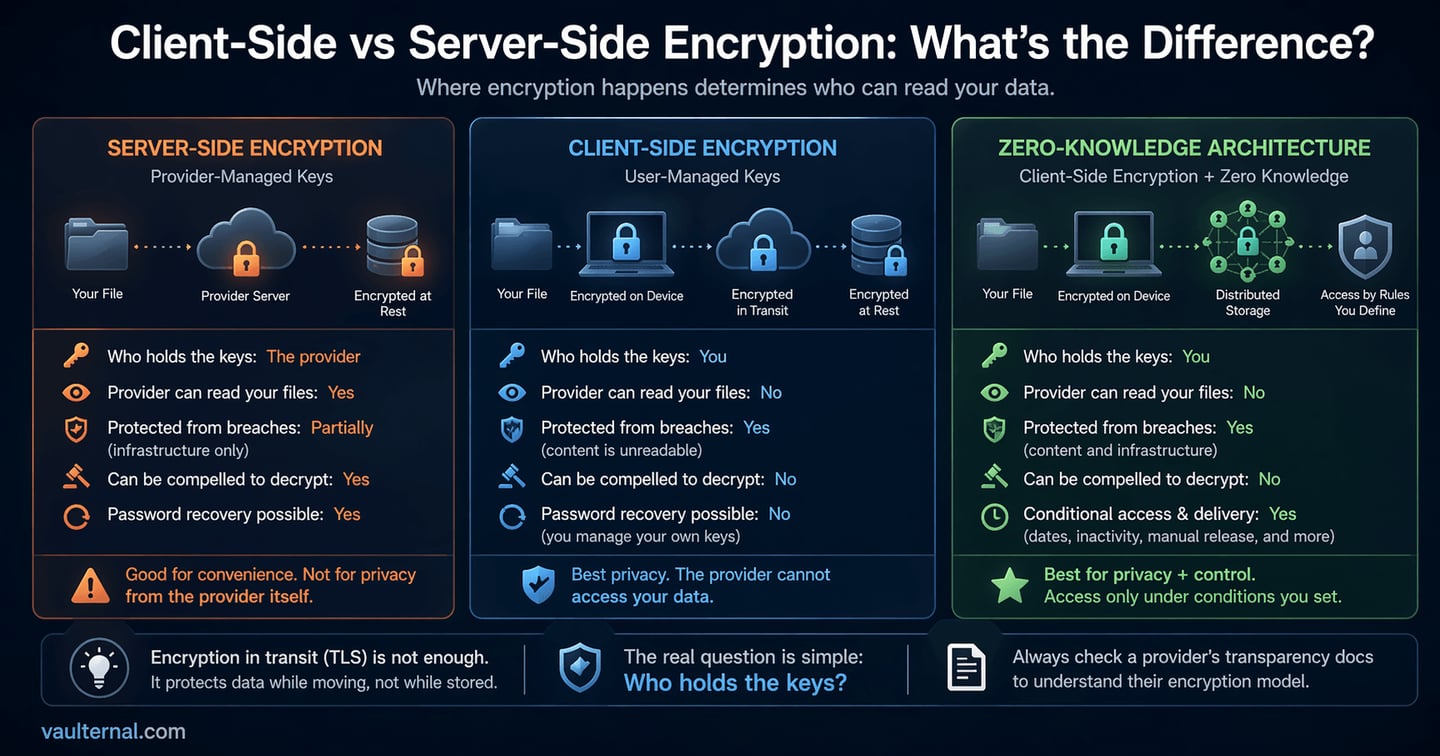
The term "zero-knowledge encryption" describes a system where the provider has zero knowledge of the contents of your data. It is client-side encryption taken to its full conclusion: the provider stores your files, maintains the infrastructure, and enforces your access rules, but it operates blind to what it is storing.
This matters because encryption claims can be misleading. A service might encrypt your data at rest on its servers while still holding the decryption keys. It might encrypt data in transit with TLS and call that "end-to-end encryption," even though the data exists as plaintext on the server between those transit segments. True zero-knowledge architecture means client-side encryption with no server-side key access at any stage.
To return to the analogy: zero-knowledge is a home safe where the manufacturer never knew the combination, has no master override, and designed the mechanism so that even they cannot open it. The math itself guarantees it.
Comparing the Three Models
Not all encryption is the same kind of protection. This table shows what each model actually guarantees.
| Server-side (provider-managed keys) | Client-side (user-managed keys) | Zero-knowledge architecture | |
|---|---|---|---|
| Who encrypts | The provider's server, after upload | Your device, before upload | Your device, before upload |
| Who holds the keys | The provider | You | You (provider never sees them) |
| Provider can read your files | Yes | No | No |
| Protected from infrastructure breach | Yes (data at rest is encrypted) | Yes | Yes |
| Protected from the provider itself | No | Yes | Yes |
| Protected from legal compulsion | No (provider can comply with decryption orders) | Yes (provider has nothing to decrypt) | Yes |
| Password recovery possible | Yes | No (you manage your own keys) | No |
| Server-side search and preview | Yes | No (server cannot read content) | No |
| Best suited for | Convenience-first storage, collaborative files | Sensitive files where privacy outweighs convenience | Sensitive files requiring the strongest privacy guarantee |
The right column is the hardest to build and the hardest to use. But for files where privacy is the priority, it is the only model where "encrypted" means what most people assume it means.
Encryption at Rest vs. in Transit: Necessary but Not Sufficient
These two terms show up on nearly every provider's security page, and they describe different layers.
Encryption in transit means data is encrypted while moving between your device and the server, typically using TLS. This prevents eavesdroppers on the network from reading data as it travels. Nearly every reputable web service uses TLS. It is a baseline rather than a differentiator.
Encryption at rest means data is encrypted while stored on disk. This protects against physical theft of storage media and certain infrastructure-level breaches.
Both layers are necessary. Neither answers the fundamental question: who can decrypt the data once it is at rest? A file encrypted at rest with server-managed keys is still readable by the provider at any time. Only client-side encryption ensures that encryption at rest is meaningful from a privacy standpoint, because the keys needed to decrypt never existed on the server.
How to Evaluate Any Provider's Encryption Claims
When a service says your files are "encrypted," one question cuts through the marketing: can the company read my files?
If the answer is yes, or "not under normal circumstances," or "only with a court order," then the provider holds the keys. The encryption protects the company's infrastructure, and to some extent its liability, but it does not protect your privacy from the provider itself.
If the answer is no, and it is architecturally enforced rather than policy-based, you are looking at a zero-knowledge system. That distinction is worth verifying. Look for specifics: where does encryption happen (on your device or the server), what algorithm is used, how are keys derived, and whether the provider ever has access to key material at any point in the flow. Providers confident in their architecture tend to document it publicly rather than hiding behind vague claims.
Vaulternal, for example, publishes a full architecture breakdown covering its client-side AES-256 encryption, key derivation, and distributed storage model. That kind of transparency is a good signal from any provider. If a service cannot or will not explain where encryption happens and who holds the keys, that silence tells you something too.
Not every file needs this level of protection. Shared photo albums, collaborative documents, and casual backups benefit from the convenience of server-managed encryption. But for files that carry real weight (insurance policies, financial records, account credentials, personal letters), the answer to "who holds the keys" is the only thing that determines whether your data is genuinely private.